No-Glow vs Low-Glow Trail Cameras: Which Is Better? (October 2026)
Choose no-glow if avoiding visible flash matters most; choose low-glow if a faint red flash is acceptable. The right no glow vs low glow trail camera depends on where it will sit, how discreet it needs to be, and whether you want cellular alerts.
On this page (7 sections)
Choose a no-glow trail camera when you want night images without visible flash, and choose low-glow when a faint red flash is acceptable. In a no glow vs low glow trail camera comparison, also consider how you retrieve images, power the camera, and manage the site.
No-glow infrared LEDs emit no visible light. Low-glow infrared LEDs produce a faint red glow when they fire, which may be noticeable to a person near the camera.
The three cameras here pair different flash styles with different features. The Meidase P70 is a non-cellular no-glow option, the Moultrie Edge 2 is a low-glow cellular camera, and the SPYPOINT Flex-S Dark offers cellular service, built-in solar power, and switchable flash settings.
 Best for no-glow SD-card scouting
Meidase P70 Non-Cellular Trail Camera
What is the difference between no-glow and low-glow?
No-glow cameras use infrared light that isn't visible, while low-glow cameras emit a faint red flash. The difference is what you can see when the camera takes a nighttime image.
Both flash styles use infrared illumination for night images. The terms describe visible light from the LEDs, not whether the camera can connect to WiFi or cellular service.
No-glow can suit a trail, feeder, or property edge where you want less visible activity. Low-glow may suit a location where a faint flash is acceptable and other camera features matter more.
A no-glow flash doesn't make the whole camera undetectable. An animal or person may notice its case, lens, mounting strap, or the disturbance from setup.
Which flash is less visible to people?
No-glow is less visible when the camera fires. Low-glow gives off a faint red light that may be seen in darkness from nearby.
That difference matters if people may pass close to the camera or you want to minimize visible signs of a device. For public land or shared property, follow local rules and get permission where needed before placing a camera.
Which trail camera should you choose?
Pick a camera by flash style, image access, and power needs together. A no-glow camera can be a poor fit if you need remote alerts, while a cellular camera may add features you don't need.
Choose the Meidase P70 for no-glow SD-card use
The Meidase P70 pairs no-glow 940nm LEDs with 64MP photos and 1296p video. It is non-cellular and non-WiFi, so you retrieve images from its SD card rather than an app.
This setup suits a camera you can visit and check in person. It requires a full-size SD card and 8 AA batteries, both sold separately, and can pair with the Meidase SP350 solar panel, sold separately.
Before you choose SD-card scouting, think about how often you can visit the camera. Our guide to trail cameras that connect to your phone explains the difference between local storage and remote image access.
Choose the Moultrie Edge 2 when cellular delivery matters
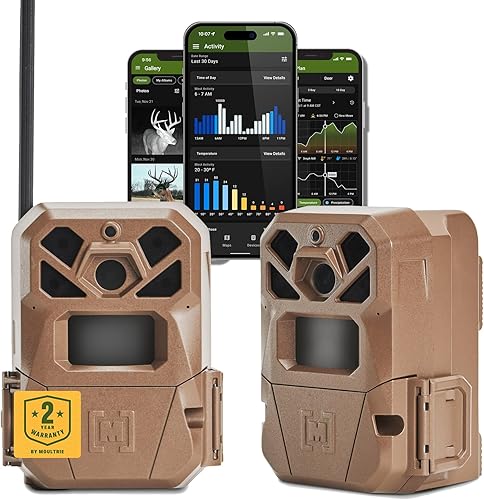
The Moultrie Edge 2 combines a low-glow infrared flash with cellular connectivity. It sends images through the Moultrie Mobile app and has 8GB of built-in memory, so it doesn't require an SD card.
Its Auto Connect feature works across major U.S. networks, and its data plans are separate from the camera. Cellular features depend on coverage where you place it, so check signal conditions before relying on remote updates.
Read our guide to cellular trail cameras, plans, and carriers if remote access is a priority. It can help you compare ongoing connection needs with a camera that stores files locally.
Choose the SPYPOINT Flex-S Dark for switchable flash and solar power
The SPYPOINT Flex-S Dark supports both no-glow and low-glow settings, which you can switch remotely. It also combines cellular connectivity, an internal battery, and a built-in solar panel.
Its no-glow mode can suit a spot where visible flash is a concern, while low-glow gives you another setting to choose. The camera can send images through the SPYPOINT app, and it requires a microSD card sold separately.
The built-in panel may reduce how often you need to manage batteries, but actual battery life varies with use. Our best solar trail cameras guide covers other power choices if solar operation is central to your setup.
Does flash style affect deer behavior?
No-glow reduces visible flash, but it doesn't guarantee deer won't notice a camera. Animals can also respond to the camera's position, scent, movement, and activity around the site.
A low-glow flash is faintly visible, but that doesn't mean every deer will react to it. Behavior varies by animal and setting, so treat flash style as one factor rather than a promise about what deer will do.
If the location is sensitive, use no-glow and place the camera where it can capture the trail without facing directly into a common approach. Avoid repeated visits that create a new disturbance.
Our guide to where to place trail cameras covers sight lines and practical placement. Good positioning helps you avoid obstructed images and reduces the need to adjust the camera after setup.
Which camera is easier to check?
Cellular cameras let you receive images remotely, while the Meidase P70 requires an in-person visit to retrieve its SD card. Decide how often you can visit before choosing a flash style.
The Moultrie Edge 2 uses the Moultrie Mobile app for remote viewing and alerts. The SPYPOINT Flex-S Dark supports image and video requests through its app, including on-demand requests; both cellular options need a usable network connection for remote features.
The Meidase P70 has a 2.4-inch color display for reviewing footage at the camera. You still need to go to the camera to see or collect those files.
For a camera on private land you visit often, SD-card storage may be simple. For a distant property or a location where every trip adds time, cellular access may be worth the extra setup and plan management.
Which night camera details should you compare?
Compare the full night imaging setup, not just the words no-glow or low-glow. Resolution, detection range, and how you use the images affect whether the camera fits the job.
The Meidase P70 has 100 ft no-glow night vision. The Moultrie Edge 2 has a 100 ft detection range and low-glow infrared flash, while the SPYPOINT Flex-S Dark has a 100 ft detection range in its product highlights.
Detection and night vision describe different things. Detection range refers to how far the camera can sense movement, while night vision range concerns how far its infrared illumination can reach; don't treat the two as interchangeable.
For image detail, the P70 has 64MP photos and 1296p video, the Edge 2 has 36MP photos and 1080p video, and the Flex-S Dark has 40MP photos and 1080p video.
These figures don't tell you which camera will produce the most useful image in your exact location. A clear view, camera angle, distance to the subject, and night conditions also shape the result.
What power and storage will each camera need?
Check power and storage before you mount a camera, because the requirements differ across these models. A solar option can reduce battery changes, while storage choices affect how you collect and keep images.
The Meidase P70 requires 8 AA batteries and a full-size SD card, both sold separately. It is compatible with the Meidase SP350 solar panel, also sold separately.
The Moultrie Edge 2 has 8GB of built-in memory and doesn't require an SD card. It can use compatible Moultrie power accessories, sold separately.
The SPYPOINT Flex-S Dark has a built-in solar panel and internal battery, and it requires a microSD card. SPYPOINT says battery life can last up to 11 months, but actual life varies with use.
Check the camera's instructions for card format, battery type, charging, and setup before installation. Our guide to trail camera batteries explains common power choices and how conditions can affect them.
How do you choose between no-glow and low-glow?
Choose no-glow if visible flash is your main concern; choose low-glow if you prefer a camera whose other features fit and can accept a faint red flash. If you want flexibility, the SPYPOINT Flex-S Dark supports both settings.
Pick the Meidase P70 for no-glow scouting with SD-card retrieval. Pick the Moultrie Edge 2 for cellular image delivery with low-glow illumination, or the SPYPOINT Flex-S Dark for cellular access, built-in solar power, and switchable flash.
Before mounting, confirm you have a workable signal for cellular features, the right storage card, and a practical way to power and check the camera. Then use our guide to WiFi vs cellular trail cameras if you're still deciding how you want images delivered.
Frequently asked questions
Can deer see a no-glow trail camera?
No-glow infrared LEDs emit no visible light, so they are less likely to reveal a flash to deer than low-glow LEDs. A camera can still be noticed by its shape or the disturbance from setup, and animal responses vary.
Is low-glow better than no-glow for night photos?
Neither flash style is automatically better for every night photo. Low-glow cameras emit a faint red light, while no-glow models use infrared light without visible flash; compare the camera's night vision and image features along with the flash type.
Does a no-glow camera need cellular service?
No. A no-glow camera can save images to an SD card without cellular service, as the Meidase P70 does.
Some cellular cameras also offer no-glow settings, such as the SPYPOINT Flex-S Dark, so flash type and image delivery are separate choices.
Will a low-glow flash spook deer?
A low-glow flash is faintly visible, but that alone doesn't predict whether deer will avoid a camera. Distance, placement, animal behavior, and activity around the site also matter; choose no-glow when reducing visible flash is your priority.
Can you switch a trail camera from low-glow to no-glow?
Only if the camera supports both settings. The SPYPOINT Flex-S Dark supports switching between no-glow and low-glow remotely, while the Moultrie Edge 2 is specified as low-glow and the Meidase P70 as no-glow.


