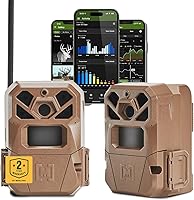
Does Tactacam Have a Multi-Camera Plan?
Yes. Tactacam sells multi-camera data plans for its Reveal cellular line, so one plan can cover several cameras on a single account. You manage them together in the REVEAL app, and the cameras share the data allowance the plan provides.
On this page (8 sections)
- How do Tactacam multi-camera plans work?
- Which Tactacam cameras work on a shared plan?
- How do you add several cameras to one account?
- Does every camera need its own SIM or plan?
- What data plan size fits a multi-camera setup?
- How do you manage several cameras in the REVEAL app?
- What should you know before running several Reveal cameras?
- Is a multi-camera plan worth it for most hunters?
Yes. Tactacam sells multi-camera data plans for its Reveal cellular cameras, so a single plan can keep several cameras sending photos to one account.
You add each camera in the REVEAL app and they all draw from the same data allowance.
That matters if you run more than one stand, plot or gate camera. A multi-camera plan is usually the cheaper way to keep a whole property connected, and the app puts every camera's photos in one place.
The short answer to "does Tactacam have a multi camera plan" is a clear yes, and the rest of this guide covers how the plans and cameras fit together.
How do Tactacam multi-camera plans work?
A multi-camera plan puts several Reveal cameras under one subscription and one data allowance. You buy the plan for the number of cameras you run, then assign each camera to your account in the app.
The cameras stay independent in the field. Each one connects through its own cellular signal and sends photos when it triggers.
The plan is the billing and data side, so the cameras do not need to be near each other or even in the same state.
Data is shared across the group. If one busy camera sends thousands of images, it uses part of the same allowance the quiet cameras draw from.
That makes multi-camera plans a good fit for a mix of high-traffic food plots and low-traffic travel corridors, where the average use stays sensible.
Which Tactacam cameras work on a shared plan?
The Reveal cellular line is built for the REVEAL app and its data plans. The current models each handle a shared plan in their own way, and the differences matter when you pick cameras for a group.
The Reveal X 3.0 is the easiest starting point for a multi-camera setup. Its integrated SIM locks onto whichever carrier has the stronger signal at each camera's spot, so you are not locked to one network across a whole property.
Built-in storage sends photos straight to your phone with no SD card to buy. It also carries a sub-half-second trigger with 3-shot burst mode, so a camera on a fast trail still catches three frames of a moving buck.
The Reveal Ultra suits hunters who want more than stills from a shared plan. Live view and HD photo requests let you look in on a spot on demand, and active GPS tracking keeps sending coordinates if the camera moves.
Its switchable no-glow and low-glow flash helps on discreet nighttime sets. The 96-ft low-glow or 80-ft no-glow flash gives you a choice between reach and stealth, and the 2-inch LCD screen is handy for checking the aim when you first hang it.
The Reveal Pro 3.0 is the budget-friendly member of the group. It takes a microSD card up to 512GB for local backup, sends 4K photos over 4G LTE, and works with solar panels.
If you plan to run three or four cameras, starting with Pros and adding an X 3.0 or Ultra where you want live view keeps the monthly bill reasonable.
How do you add several cameras to one account?
You add cameras one at a time in the REVEAL app, and each one joins the same plan and photo feed. The steps are quick because the antenna and SIM come pre-installed on the Reveal models.
- Download the REVEAL app and create or sign in to your account.
- Pick your multi-camera data plan and set up billing.
- Power on the first camera and scan its QR code when the app asks.
- Name the camera after its location so you can tell them apart later.
- Repeat for each camera, checking that every one shows as active in the app.
Our walkthrough of how to add a camera on Tactacam covers the scan-and-name steps in more detail. Name cameras by stand, gate or plot from the start, because a long list of unnamed cameras gets confusing fast.
The pre-installed antenna and pre-activated SIM mean most of the work is in the app rather than at the tree, so a batch of cameras can be up and running before you walk the property.
Does every camera need its own SIM or plan?
No. The Reveal cameras come with their SIM already installed, and a multi-camera plan covers the group rather than one camera each.
You do not swap SIMs or open the camera to get connected.
The auto-connect design on the X 3.0 means each camera finds the stronger carrier at its own location. That is the main advantage of running several cameras on one plan: one camera can lean on Verizon in a valley while another picks up AT&T on a ridge, and both still report to your account.
Because the SIM is already inside and activated, adding a second or third camera to the plan does not mean buying or fitting separate SIM cards.
You only need to think about separate plans if you want entirely separate bills. For a family or a club running a handful of cameras, one shared plan is the simpler and cheaper route.
What data plan size fits a multi-camera setup?
Pick the plan by how many photos and videos you expect across all the cameras, not per camera. A shared allowance runs out faster when several cameras sit on active scrapes or feeders.
Start with a modest plan and watch your first month's usage in the app. If photos arrive constantly and you also request video, move up a tier.
On-demand video and live view on the Ultra draw more data than stills, so factor those in if you plan to check in remotely.
Low-traffic cameras, such as a gate monitor or a travel corridor, barely touch the allowance. The cameras doing the heavy lifting are the ones on bait, feeders or fresh scrapes.
Budget the plan around those and let the quiet cameras ride along.
How do you manage several cameras in the REVEAL app?
The REVEAL app is the control room for a multi-camera account. Each camera has its own page with settings, battery status and recent photos, and the main feed mixes images from all of them.
Built-in GPS on the X 3.0 helps you find a camera on the map when you are standing in thick timber and cannot remember which tree you used.
Use camera names and locations to sort the feed. You can change trigger settings, request photos or video, and check signal strength from the app without visiting the camera.
That saves a lot of walking on a large property.
The app also shows how much data the group has used. That number is your early warning to adjust settings or move to a bigger plan before the cameras go quiet at the worst moment of the season.
What should you know before running several Reveal cameras?
Plan power and placement before you buy the plan. Cellular cameras eat batteries fastest when signal is weak, so check each spot's signal first and add solar where the sun reaches.
The Reveal line supports solar panels, folding solar panels, battery belts and lithium cartridges, so you can keep cameras running for months without visits. Match the power setup to each location: a sunny food plot camera can run on solar, while a shaded timber camera may need a bigger battery pack.
The X 3.0 is rated for 6+ months of standby on one set of batteries, which sets a realistic baseline for the group.
Use the same care with cards and storage. Cameras with built-in storage skip the SD card, while the Pro 3.0 takes a microSD card for backup.
Our guide to trail camera batteries explains what each model needs to last a season.
Is a multi-camera plan worth it for most hunters?
Yes, for anyone running two or more cellular cameras. A shared plan cuts the per-camera cost and keeps every camera in one app, which is simpler than juggling separate subscriptions and separate feeds.
Skip the multi-camera plan only if you run a single camera or want each one billed separately. For a club or a family with several stands, the shared plan is the practical choice.
Compare the models in our guide to the best trail cameras for deer hunting and our plain game camera buying guide before you decide how many to connect.
If you are still weighing whether cellular is right for your land, the answer to does Tactacam have a multi camera plan is the reason many hunters switch: one plan, one app, and a whole property covered. Start with the X 3.0 as your main camera, add a Pro 3.0 on quieter sets, and use the Ultra where live view earns its data.
Frequently asked questions
Can I use one Tactacam plan on cameras in different states?
Yes. The plan follows your account, not a single camera location.
Each Reveal camera connects through its own cellular signal wherever you place it, so a camera on one property and another several hours away both report to the same app.
Do all Tactacam Reveal models work on the same plan?
The Reveal cellular cameras are built for the Reveal data plans and app, so a multi-camera plan is the normal way to run more than one. Older or non-cellular models do not need a plan at all, since they only store photos on a card.
What happens if I run out of data mid-month?
Your cameras stop sending new photos until the plan renews or you add data. The cameras keep recording to internal storage or an SD card, so you can collect those images in person and keep the spot active.
Can I share a multi-camera plan with a hunting buddy?
Tactacam's plans are tied to one account and its cameras. The usual approach is for one person to own the plan and the cameras, then share app access or review photos together, rather than splitting one subscription across two separate accounts.
Is a multi-camera plan cheaper than separate plans?
Tactacam's multi-camera plans are priced as bundles for several cameras rather than one camera at a time. The more cameras you add to a single plan, the less you pay per camera compared with running each one on its own separate subscription.