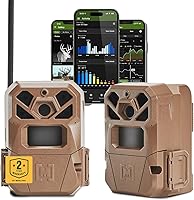
How to Set Up a Moultrie Trail Camera
To set up a Moultrie trail camera, charge the batteries, mount the camera about 4 to 6 feet up a sturdy tree, aim it at the trail, and set the date, time and capture mode in the menu. Then close the latch and walk away.
On this page (10 sections)
- What should you do before you head to the woods?
- How do you choose the right spot for a Moultrie camera?
- How should you mount a Moultrie trail camera?
- How do you load and manage trail camera batteries?
- How do you aim a Moultrie camera for clear photos?
- How do you set date, time and capture mode in the menu?
- How should you secure a trail camera on public land?
- How do you test and maintain a Moultrie camera?
- What should you check if your Moultrie camera isn't taking photos?
- What is the best way to set up a Moultrie trail camera for the season?
To set up a Moultrie trail camera, charge the batteries, mount the camera about 4 to 6 feet up a sturdy tree, aim it at the trail, and set the date, time and capture mode in the menu. Then close the latch and walk away.
A good setup is mostly about where you put the camera and how well you secure it. Get those two things right and the menu settings take a few minutes.
This guide walks through the whole process, from picking the spot to checking the first batch of photos.
What should you do before you head to the woods?
Prepare the camera at home first, then take it to the field. That way you can fix battery and card problems at a table instead of in the dark.
Load fresh batteries and a formatted SD card before you leave. Set the date and time while you still have a light source and clean hands.
Many cameras lose their clock when the batteries are pulled, so set it after the batteries are in.
Clean the lens and the sensor window with a soft cloth. Check that the latch closes and the seal sits flat.
Run a quick test in your yard to confirm the camera fires when something crosses in front of it.
Pack a small tool kit: extra batteries, a spare card, a rag and a screwdriver if your camera uses one. Charge your phone for any app-based model.
If your camera is the cellular kind, our guide to how to set up a cellular trail camera covers the plan and app steps.
How do you choose the right spot for a Moultrie camera?
Pick a spot with a clear view of the trail and no branches swinging in front of the lens. Good placement matters more than any menu setting.
Look for a tree or post that faces the trail or food plot broadside. Set the camera so game walks across the frame rather than straight toward or away from it.
That gives the sensor time to trigger and the lens time to focus.
Aim at a height of about 4 to 6 feet. Angle the camera slightly downward so it catches the body of a deer, not just its head.
On sloped ground, adjust the height so the view stays level.
Clear tall grass and twigs from the field of view. A branch moving in the wind can fill an SD card with empty shots.
Face the lens away from the rising or setting sun to avoid glare.
Think about security too. Place the camera where you can reach it without trampling the area, but not right next to a road or trailhead where people might spot it.
How should you mount a Moultrie trail camera?
Strap the camera tight to a tree trunk at about chest height, then lock it down. A loose mount lets the camera shift and ruins the aim.
Most Moultrie cameras have a threaded insert or a strap slot on the back. Run the strap around the trunk and cinch it until the camera cannot twist.
A padded strap spreads the pressure and holds better than a thin cord.
Aim the camera before you fully tighten the strap. Many hunters use a small level or the camera's test mode to check the angle.
Once it looks right, snug the strap and give the camera a gentle nudge to confirm it stays put.
Which mount straps work well for a Moultrie camera?
The Moultrie Camera Mount Straps are a solid match because they fit all Moultrie models and wrap around trees of many sizes. The 8-foot length gives you room for thicker trunks.
The set comes as a 2-pack, so you can set up a second camera or keep a spare. The buckles make it quick to loosen and move the camera when you want to change spots.
Nylon holds up to rain and sun better than rope or bungee cord.
How do you load and manage trail camera batteries?
Use fresh AA batteries and match the type to the season. Lithium batteries handle cold weather better than alkaline, which matters for a camera that sits out all winter.
Open the battery bay and check the polarity marks before you push each cell in. Most Moultrie cameras take 4 to 12 AA batteries depending on the model.
Don't mix old and new cells or different brands in the same camera.
Close the bay firmly so the seal keeps water out. Check the camera's battery meter in the menu and note the level so you know when to plan a return trip.
A low battery often means the camera stops taking night photos first.
Carry spares in your pack. If the camera sits in deep cold, swap in a fresh set before the first hard freeze.
Which batteries suit a Moultrie trail camera?
The Energizer Ultimate Lithium AA Batteries are the pick for cold-weather setups because lithium holds power in extreme temperatures better than alkaline cells. They suit cameras that stay out through winter.
The 24-pack covers several cameras or a couple of battery changes. Energizer says these cells can sit in storage for up to 25 years.
The leak-proof construction helps protect the camera's contacts. For a deeper comparison of cell types, see our guide to trail camera batteries.
How do you aim a Moultrie camera for clear photos?
Use the camera's test or aim mode to check the frame before you walk away. Most Moultrie models have a setup mode that blinks a light when the sensor detects motion.
Stand where you expect game to pass and wave or walk through the trail. Watch where the light fires.
If it triggers late, turn the camera slightly toward the approach path. If it fires on a swaying branch, clear the branch or shift the aim.
Set the photo or video mode you want and choose the burst count. A 3-photo burst catches a deer moving through.
Video gives you more detail but fills the card faster and drains batteries quicker.
Check the field of view against a landmark, like a stump or fence post. That helps you judge distance in later photos.
Aim so the trail crosses the middle of the frame at the range you expect game.
How do you set date, time and capture mode in the menu?
Open the menu, set the date and time, then pick your photo or video mode. The exact buttons vary by model, but the steps are the same.
Use the arrow keys to move through the menu and the OK or select button to confirm. Set the date first, then the time, so the stamps on your photos stay in order.
Set the time zone if the camera offers one.
Choose the resolution and the trigger interval. A shorter interval takes more photos of a passing animal, but a longer one saves battery and card space.
Turn on the timestamp and the moon phase or temperature stamp if you want that data.
Set a quiet period if you only want daylight photos. Many cameras also offer a hybrid mode that takes stills and video together.
Save your changes and close the menu.
How should you secure a trail camera on public land?
Lock the camera to the tree and hide it as best you can. A cable lock won't stop a determined thief, but it stops the easy grab.
Run a cable through the camera's security slot and around the trunk. Lock it close to the camera so there's no slack to work with.
Tuck the camera into cover so it's less obvious from the trail.
Which lock fits a Moultrie camera?
The Master Lock Python Cable Lock works well here because the adjustable cable holds tight at any point along its length. That lets you fit it to trees of different sizes.
The braided steel cable is 6 feet long and 3/16 inch thick. A vinyl coating protects the bark and the camera from scratches.
The rust-resistant lock holds up to weather. Check that your camera has a security slot or a place to pass the cable before you buy.
How do you test and maintain a Moultrie camera?
Run a test pass, then check the camera every few weeks. A quick first check catches aim problems before you lose weeks of photos.
After you mount the camera, walk past it and then pull the card to confirm it caught you. Review the first few photos for framing, focus and the time stamp.
Adjust the aim or settings if the shots are blurry or off-center.
On later visits, swap the card and check the battery level. Wipe the lens and clear spider webs or leaves from the view.
Tighten the strap if the camera has shifted. Bring the card home and copy the photos before formatting it in the camera.
Keep a log of each camera's location and settings. That makes it easier to compare spots and decide where to hunt.
For camera options and features, see our roundup of the best trail cameras for deer hunting.
What should you check if your Moultrie camera isn't taking photos?
Start with the battery level and the SD card. Most missed-photo problems come from a weak battery or a full or unreadable card.
Check that the camera is switched to the right mode and not set to a quiet period. Make sure the date and time are still correct.
If the camera takes daylight shots but misses night game, the night sensor or the batteries may be the cause.
If the app or cellular link fails, check the signal strength and the plan status. Our review of the Moultrie Edge 2 covers how the app works on one popular model.
Move the camera if the signal is weak.
What is the best way to set up a Moultrie trail camera for the season?
Mount it tight, aim it across the trail, use lithium batteries and lock it down. That combination gives you clear photos and fewer return trips.
Pick a tree that faces the trail broadside, set the camera 4 to 6 feet up, and use the test mode to check the aim. Load lithium AAs so cold nights don't drain the camera.
Strap it with a Moultrie mount strap and add a cable lock on public land.
Check the card and battery level every few weeks. If you want to compare models before you buy another camera, read our trail camera buying guide and then come back to this setup checklist.
Frequently asked questions
How long do batteries last in a Moultrie trail camera?
It depends on the model and how many photos it takes. Lithium AA batteries are the safer choice in cold weather because they hold up better than alkaline.
Turn on the camera's low-battery alerts and check the card every few weeks.
Do I need a cellular plan to use a Moultrie camera?
No. A standard Moultrie trail camera works without any plan and stores photos on an SD card.
You only need a data plan for cellular models that send pictures to your phone.
How high should I mount a trail camera?
About 4 to 6 feet off the ground is a good starting point. That height points the lens at the chest of most deer while keeping the camera away from mud and splashes.
Adjust for the slope and the size of game in your area.
What SD card size works best for trail cameras?
An 8 GB to 32 GB SD card is plenty for most Moultrie cameras. A larger card holds more photos between visits, but a smaller one is easier to review quickly.
Format the card in the camera before its first use.
Should I delete photos from the SD card after each check?
No. Copy the photos to a computer first, then format the card in the camera when you are ready to start fresh.
That keeps the card healthy and avoids corrupt files from repeated partial deletes.