Moultrie Edge 2 Cellular Trail Camera Review: Worth It? (October 2026)
The Moultrie Edge 2 suits remote scouting when you want cellular photo delivery, built-in memory and app controls. It captures 36MP photos and 1080p video, with a stated 100-foot detection range.
On this page (10 sections)
- What does the Moultrie Edge 2 do well?
- Who should buy the Moultrie Edge 2?
- What image and video features matter in the field?
- Is the Edge 2's built-in memory right for you?
- How do you set up the Edge 2?
- What should you know about cellular service and plans?
- What power and upkeep should you plan for?
- How does the Edge 2 compare with alternatives?
- What mistakes should you avoid with the Edge 2?
- Is the Moultrie Edge 2 the right camera for you?
The Moultrie Edge 2 is a cellular trail camera for hunters who want remote photo delivery without adding an SD card. Its 8GB internal memory, app controls and Auto Connect make it a practical fit for scouting locations that take time to reach.
The camera captures 36MP stills and 1080p HD video with audio. Consider the Edge 3 if AI buck detection, Live Aim and built-in GPS would change how you scout.
What does the Moultrie Edge 2 do well?
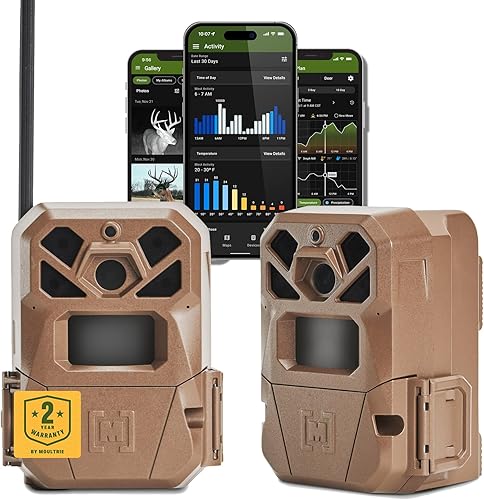
The Edge 2's strongest use is remote scouting with cellular access, built-in memory and app control. The Moultrie Mobile app lets you view images, adjust settings, check battery levels and receive alerts.
Moultrie Edge 2 Cellular Trail Camera: Best for remote property scouting
- 36MP photos
- 1080p HD video with audio
- 8GB built-in memory
- 100-foot detection range
A cellular camera with internal memory, app controls and multi-carrier Auto Connect. It fits hunters who want remote image access without adding an SD card.
Pros
- 8GB internal memory
- 36MP photos and 1080p video with audio
- Auto Connect across major U.S. networks
- App tools include maps and activity charting
Cons
- Power accessories are sold separately
- Cellular use requires a plan
- No AI buck detection or Live Aim
Its 36MP photos and 1080p video with audio give you still and moving image options. Moultrie describes its image sensor as improving low-light performance, and the camera uses a low-glow infrared flash for nighttime capture.
The app adds Game Plan for pattern analysis, Activity Charting for movement trends and Maps for property management. These tools can help organize observations when you manage more than one camera or want to compare movement over time.
Who should buy the Moultrie Edge 2?
Choose the Edge 2 if you want cellular image access and internal storage in one camera. It suits a remote location where a trip to retrieve a memory card would take time, or a property where you want to check activity from your phone.
It's also a sensible choice if 1080p video with audio and app-based controls cover your needs. The camera keeps the workflow simple: activate it, mount it, and use the app to review images and check its status.
Skip it if you want removable storage for direct file transfers, or if a cellular plan does not fit your budget or routine. A non-cellular camera can be a better match for a site you visit often and can check in person.
Choose a different Moultrie model if you want AI buck detection or Live Aim. The Moultrie Edge 3 adds those features and built-in GPS.
What image and video features matter in the field?
The Edge 2 captures 36MP still photos and 1080p HD video with audio, with low-glow infrared illumination for night use. Those features suit general deer scouting when you want both images and video available in the app.
| Feature | Moultrie Edge 2 |
|---|---|
| Still photo resolution | 36MP |
| Video | 1080p HD with audio |
| Detection range | 100 feet |
| Flash | Low-glow infrared |
| Built-in memory | 8GB |
| Cellular connection | Auto Connect across major U.S. networks |
| App | Moultrie Mobile |
| Mounting | Tree mount; ¼-20 threaded male post compatibility |
Use the stated 100-foot detection range as a guide, not a reason to point the camera at the widest opening you can find. Aim across a trail or travel route, where an animal is more likely to move through the frame rather than straight toward it.
A low-glow flash uses infrared light, so it may be visible at close range. If reducing visible flash is a priority, compare camera flash types in our game camera buying guide.
Is the Edge 2's built-in memory right for you?
The Edge 2's 8GB of built-in memory means you don't need an SD card to store images on the camera. That makes initial setup easier if you want to activate it and mount it without buying or formatting a separate card.
Moultrie includes unlimited cloud storage in its app. Remote access still depends on a working cellular connection, so test service at the intended location before leaving the camera somewhere difficult to reach.
Internal memory won't work like a removable card that you can take home and plug into a computer. If direct file transfer is part of your normal routine, choose a camera with removable storage instead.
Power planning matters just as much on a remote setup. Our guide to trail camera batteries and power explains what to consider when choosing a power source and planning visits.
How do you set up the Edge 2?
Set up the camera in the Moultrie Mobile app and confirm that it reports and sends an image before you leave the site. Doing that first helps catch a weak signal, a framing problem or a setup issue while the camera is still easy to reach.
- Create or open your Moultrie Mobile account and activate the camera in the app.
- Choose a mounting spot that faces a route animals use, with a steady tree or compatible mount.
- Check cellular service and send a test image before leaving.
- Review the framing in the app and adjust the angle if the route is cut off or too far to one side.
- Check the battery level and confirm alerts and settings are set the way you want.
The Edge 2 fits Moultrie's Easy Aim Mount, Flex Mount and Camera Stake, along with mounts that use a ¼-20 threaded male post. Use a stable mount so the camera doesn't shift after you aim it.
For more placement ideas, see where to place trail cameras. Avoid aiming at moving branches or directly into sun glare, both of which can make footage harder to interpret.
What should you know about cellular service and plans?
Auto Connect lets the Edge 2 access major U.S. networks without swapping SIM cards, but useful service still depends on coverage at the exact camera location. Trees, terrain and distance from a tower can affect whether images reach your phone promptly.
Check coverage in the area where you plan to mount the camera. A map can help narrow down a location, but sending an image from the actual spot is a better check before you leave it unattended.
Cellular use requires a Moultrie plan. Plans start at 9.99 dollars per month, and current plan terms can change, so review them in the Moultrie Mobile app before choosing a setup.
Read our cellular trail camera guide for help comparing plans, coverage and remote camera workflows. If you want to understand how a camera connects to a phone, see how trail cameras connect to phones.
What power and upkeep should you plan for?
The Edge 2 supports compatible external power accessories sold separately, including Power Mag, Power Mag+, a 10W Solar Power Pack, a 3.4W Solar Power Pack and a battery box. It also includes a battery tray, camera body and strap.
Use the battery tray if you can check the camera regularly. For a harder-to-reach site, compare compatible external power choices against how often you can make a visit, and keep an eye on battery status through the app.
During routine visits, check that the camera remains firmly mounted and aimed at the same route. Clear nearby growth that blocks the view, and confirm the housing and strap remain in place after weather or animal activity.
Moultrie provides a 2-year warranty from activation through the Moultrie Mobile app. Save activation details and review the warranty terms as part of setup.
How does the Edge 2 compare with alternatives?
The Edge 2 is the straightforward pick for built-in memory and app-based remote scouting, while the alternatives add different features. Choose based on the scouting information you want and the storage and cellular setup that fits your property.
Is the Moultrie Edge 3 worth the upgrade?
Choose the Edge 3 if AI buck detection, Live Aim and built-in GPS would help you act on deer movement or place cameras more precisely. It captures 40MP photos, has a stated 0.5-second trigger and records 1080p HD video.
The Edge 2 makes more sense when you want the core cellular features and internal memory without those extra scouting tools. If your main goal is to receive images remotely, the Edge 3's additions may not change your decision.
When does the Stealth Cam Fusion Max make sense?
The Fusion Max suits shoppers who want two pre-installed SIM cards for AT&T or Verizon and the Command Pro app. It captures 36MP stills and 1080p video, with a stated 80-foot detection range.
Plan for its power setup: it uses 16 AAA batteries, not included, or another compatible power option. Its stated detection range is shorter than the Edge 2's.
Who should consider the SPYPOINT FLEX-M?
The FLEX-M fits shoppers who want photo, video, time-lapse and time-lapse plus modes. Its free plan transmits up to 100 photos per month, and the camera requires a microSD card sold separately.
Choose it when those capture modes and its free monthly photo allowance suit your routine. Skip it if you want built-in storage or prefer 1080p video, since the FLEX-M records 720p video and takes 28MP photos.
What mistakes should you avoid with the Edge 2?
The most common setup mistake is assuming that broad network access guarantees a usable signal at your camera location. Send a test image from the mounting spot before leaving, especially if reaching the camera later would be inconvenient.
Don't aim only for distance. A route that crosses the frame gives you a better chance of seeing an animal's movement than a wide view with the trail at the edge.
Don't overlook the plan and power costs when comparing cameras. The Edge 2 needs cellular service, and its compatible external power accessories are sold separately.
Finally, don't choose it for features it doesn't have. If AI buck alerts, Live Aim or built-in GPS are essential, compare the Edge 3 before buying.
Is the Moultrie Edge 2 the right camera for you?
Choose the Moultrie Edge 2 if cellular photo delivery, 8GB internal memory and app controls are your priorities. It fits remote scouting when you want 36MP photos, 1080p video and no SD card to manage.
Pick the Edge 3 if its AI buck detection, Live Aim and GPS are worth the added features to you. Compare the other options in our cellular camera guide, then make your choice based on local coverage, power needs and how you prefer to access images.
Frequently asked questions
Does the Moultrie Edge 2 need an SD card?
No. The Edge 2 has 8GB of built-in memory, so it can store photos without an SD card.
Moultrie includes unlimited cloud storage in its app.
Cellular service supports remote photo access, so check coverage and current app and plan terms for your setup.
Does the Moultrie Edge 2 work on different cellular networks?
The Edge 2 uses Moultrie's Auto Connect technology to access major U.S. networks without swapping SIM cards. Cellular service still depends on coverage where you place the camera, so check the carrier coverage in your hunting area before relying on remote photo delivery.
How far can the Moultrie Edge 2 detect movement?
The Edge 2 has a stated detection range of 100 feet. Actual captures depend on placement, terrain, animal movement and conditions, so aim it across a travel route and check the framing in the app after setup.
What is the difference between the Moultrie Edge 2 and Edge 3?
The Edge 2 has 36MP photos, 1080p video and 8GB of built-in memory. The Edge 3 adds 40MP photos, a 0.5-second trigger, AI buck detection, Live Aim and built-in GPS, which may suit hunters who want those scouting tools.