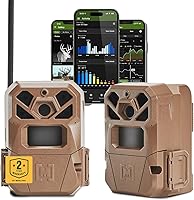
How to Set Up a Reveal Game Camera
To set up a Reveal game camera, load fresh lithium AA batteries, mount the camera about chest high and clear of brush, then download the REVEAL app and scan the QR code on the camera. The app walks you through the carrier check and the photo settings.
On this page (9 sections)
- How do you set up a Reveal game camera before leaving home?
- What do you need in the box before setup starts?
- How do you mount a Reveal camera on a tree?
- How do you connect a Reveal camera to the app?
- Which settings should you change first?
- How do you lock and weatherproof the setup?
- How do you test the camera before you walk away?
- How do you keep a Reveal camera running all season?
- Which Reveal setup fits your spot?
To set up a Reveal game camera, load fresh lithium AA batteries, mount the camera about chest high and clear of brush, then download the REVEAL app and scan the QR code on the camera. The app walks you through the carrier check and the photo settings.
The steps below cover the whole job, from charging the batteries to the first photo landing on your phone. Most of the work is done before you ever climb a tree.
How do you set up a Reveal game camera before leaving home?
Do the app download, the battery load, and the QR scan at home, where the phone signal and the light are both reliable. Setting up on site with cold fingers and a weak signal is where most of the frustration starts.
Charge or buy fresh batteries first. Tactacam recommends lithium AAs for the Reveal line, and the Energizer pack below covers a full season for most setups.
Then open the camera's battery tray and seat each cell the way the tray diagram shows.
Next, install the REVEAL app on your phone and create an account. The app is where you'll set the photo delay, the burst count, and the send schedule.
Get the app working at home so the camera and the phone are already paired.
What do you need in the box before setup starts?
A Reveal camera, fresh AA batteries, a mounting strap or bracket, and a phone with the REVEAL app cover the basic kit. Add a cable lock and a small tool kit so the mount and the battery door are secure.
The Reveal X 3.0 arrives with the antenna and SIM card already installed. You still need to confirm the battery count and the mounting hardware before you leave.
Check the strap or bracket fits the tree size you plan to use.
If you haven't bought a camera yet, our game camera buying guide explains the differences between cellular and non-cellular models. A cellular camera like the Reveal sends photos to your phone, while a standard model stores them on a card you collect later.
For a broader comparison of brands and specs, see our roundup of the best trail cameras.
How do you mount a Reveal camera on a tree?
Mount the camera about chest high, angled slightly down, and facing north or south so the sun doesn't fire straight into the lens at dawn or dusk. A level mount keeps the field of view centered on the trail.
Pick a tree that gives a clear view of the trail, scrape, or field edge. Clear small branches and brush in front of the lens so the trigger sensor sees movement without leaves flapping in the wind.
Use the strap or bracket to hold the camera tight against the trunk. A camera that shifts in the wind takes blurry photos and sends false alerts.
Check the aim by looking at the camera's view screen or the app's test photo.
Should you mount a Reveal camera high or low?
Mount the camera at chest height for most setups, because it catches both standing and crouching game. A high mount looks down on the trail and can miss close animals; a low mount picks up more brush and false triggers.
If your site gets heavy foot traffic from people or livestock, raise the camera to head height and angle it down. That keeps the camera out of casual reach and still covers the trail.
How do you aim the camera to avoid false triggers?
Point the lens down the trail, not across it, so animals move toward or away from the sensor rather than cutting across it. Keep the aim below the horizon and away from swaying branches.
Sunlight on a moving branch triggers the sensor as readily as a deer. Clear the field of view and face the lens away from the rising and setting sun.
Check the first few photos and adjust if you see empty frames.
How do you connect a Reveal camera to the app?
Turn the camera on, open the REVEAL app, and scan the QR code inside the camera or on its box to link it to your account. The app then runs a signal check and walks you through the carrier and photo settings.
The Reveal X 3.0 uses a pre-activated SIM and an auto-connect multi-carrier design. It locks onto whichever LTE carrier is stronger at your spot, so you don't swap cards or pick a network by hand.
Follow the app's prompts to name the camera, set the photo delay, and choose how often it sends. A longer send interval saves battery.
The app confirms when the camera is live and the first photo should follow shortly.
Which settings should you change first?
Set the photo delay and the burst count first, since they decide how many photos the camera takes and how long the batteries last. A 3-shot burst helps when game moves fast.
The Reveal X 3.0 fires in under half a second and takes three photos per trigger. That's a good default for trails where a buck can cross in a hurry.
A longer delay, such as a few minutes, cuts the number of empty frames.
Set the send schedule to fit your check-ins. Daily sends are enough for scouting; more frequent sends suit property monitoring.
Keep the video resolution modest to stretch battery life.
How do you lock and weatherproof the setup?
Run a cable lock through the camera's lock point and around the tree, then close the battery door and check the seal. A lockable camera stays put, and a tight seal keeps rain out.
The Master Lock Python cable is 6 ft long and made of braided steel with a vinyl coat. It adjusts to fit almost any trunk and comes with two keys.
Point the cable away from the lens so it doesn't cross the view. Leave a little slack so the camera isn't crushed against the bark, and keep the lock out of sight from the trail.
How do you keep rain and condensation out?
Seal the battery door and keep the lens clear, because the Reveal X 3.0 is rated IP66 against dust and water. Check the door gasket for grit and press it shut firmly.
Wipe the lens with a soft cloth when you check the camera. Condensation inside the housing means the seal needs attention.
A small desiccant pack in the battery compartment helps in humid weather.
How do you test the camera before you walk away?
Run the app's test mode and take a few photos, then wait for one to reach your phone before leaving the site. A signal reading and a received photo prove the whole chain works.
Walk in front of the lens to trigger a shot. Watch the app for the upload, and check the framing on that image.
Adjust the aim if the trail sits off center.
Confirm the battery level in the app. A weak battery sends fewer photos.
If the signal is poor, raise the camera or move it to a more open spot, then test again.
How do you keep a Reveal camera running all season?
Use lithium batteries and a longer send interval, and plan a mid-season check to swap cells and clear the lens. Cold weather drains batteries faster, so start with fresh ones before the season opens.
Our guide to trail camera batteries compares lithium and alkaline options and covers solar add-ons. A solar panel can stretch the gap between swaps in sunny spots.
For a step-by-step walkthrough on another model, see how to set up a Moultrie trail camera.
Keep a spare set of batteries in your pack. Check the camera after heavy storms and clear snow from the lens.
A quick monthly visit catches a loose strap or a fogged lens before it costs you a week of photos.
Which Reveal setup fits your spot?
For most hunters setting up a Reveal game camera, start with the Reveal X 3.0 and a set of lithium AAs, then add a cable lock if the site is on public land or easy to reach. The auto-connect carrier design takes the guesswork out of the signal check.
If your spot has weak LTE, mount higher and aim away from hills. If theft is a worry, add the Python cable before you leave.
Either way, run the test photo first, and the setup is done.
The one rule that matters most: don't walk away until a photo reaches your phone. That single check confirms the mount, the signal, and the settings in one step.
Frequently asked questions
Does a Reveal camera need Wi-Fi to send photos?
No. A Reveal cellular camera sends photos over LTE, so you don't need Wi-Fi or a router near the tree.
The camera's SIM finds a signal on its own, and the REVEAL app delivers the photos to your phone wherever you have service.
How long do batteries last in a Reveal camera?
Tactacam says up to 6 or more months with the right power setup. Battery life depends on how many photos the camera takes, how strong the LTE signal is, and how cold the weather gets.
Fresh lithium AAs are the safest starting point.
Where should I aim a Reveal camera on public land?
Point it at a trail, scrape, or field edge, not at another hunter's stand or a campsite. Keep the camera off posted private land unless you have permission.
On public land, follow your state's rules on cameras and check the back of the camera for its serial number in case it's stolen.
What should I do if the Reveal app shows no signal?
Raise the camera a few feet, turn the lens away from a hill or dense canopy, and run the app's signal check again. Trees, metal buildings, and steep terrain block LTE.
If the reading stays weak, move the whole setup to a more open spot before you leave it.
Do I need an SD card for the Reveal X 3.0?
No. The Reveal X 3.0 has built-in storage and moves photos straight to your phone, so there's no card to buy or format.
Other trail cameras often do need a card, and our trail camera batteries guide covers what else to plan for.