Tactacam Reveal Pro 3.0 Cellular Camera Review: Worth It? (October 2026)
The Tactacam Reveal Pro 3.0 suits hunters who want cellular photos, remote video requests and optional SD card backup. Choose it when the camera site has usable LTE and you’re comfortable paying for a cellular plan.
On this page (7 sections)
- What does the Tactacam Reveal Pro 3.0 offer?
- How does cellular setup and service work?
- What should you know about battery life and storage?
- How does the Reveal Pro compare with other cellular cameras?
- How do you set up the Reveal Pro for scouting?
- Is the Reveal Pro 3.0 a good fit for your property?
- Should you buy the Tactacam Reveal Pro 3.0?
The Tactacam Reveal Pro 3.0 is a cellular trail camera for hunters who want remote photos and on-demand video. Its pre-installed antenna and pre-activated SIM simplify setup, and an optional microSD card provides local photo and video backup.
The main trade-offs are the paid cellular plan and battery life that varies with use and temperature. If you want to scout from your phone and the camera site has LTE coverage, the Pro is a strong fit; if you can visit the site easily and rarely need remote checks, a non-cellular camera may be simpler.
What does the Tactacam Reveal Pro 3.0 offer?
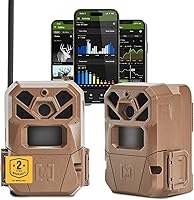
The Reveal Pro 3.0 combines 4G LTE photo delivery, remote video requests and optional local storage. The box includes the camera, battery tray, antenna and tree strap.
Tactacam Reveal Pro 3.0 Cellular Trail Camera: Best for remote scouting

- 4G LTE connectivity
- On-demand photos and video clips
- Optional microSD backup up to 512GB
A cellular camera for checking activity through the app and requesting photos or video remotely. It also supports a microSD card for local backup.
Pros
- Pre-installed antenna and pre-activated SIM
- Remote on-demand photos and video
- Optional microSD backup
- Solar compatible
Cons
- Requires a paid cellular subscription for full features
- Battery life varies with use and temperature
- MicroSD card sold separately
The camera’s stated video resolution is 1080 pixels. Its microSD slot supports a Class 10 or higher card up to 512GB, sold separately, so add a suitable card if you want a local copy as well as cellular delivery.
Remote access changes how you use a trail camera. You can check activity without walking to the tree, which is useful on distant ground or when frequent visits might disturb the area.
The benefit depends on reliable coverage where the camera sits, not just where you live.
Who should choose the Tactacam Reveal Pro 3.0?
Choose the Reveal Pro 3.0 if you want to review images on your phone and request a video clip remotely. It suits hunters monitoring a trail, field edge or travel corridor who value fewer routine trips to the camera.
Skip it if you want to avoid a recurring cellular plan or the planned site has unreliable LTE. A standard SD card camera is easier to justify when you can visit regularly and don’t need remote delivery.
It can also suit landowners who want remote visibility of activity on a property. For home security, consider whether a trail camera’s motion alerts and cellular workflow match the job before buying; the Pro is a scouting camera, not a dedicated security system.
How does cellular setup and service work?
The Reveal Pro 3.0 arrives with a pre-installed antenna and pre-activated SIM, and Tactacam says setup can take minutes. It uses 4G LTE, so check coverage at the precise location where you intend to mount it.
Start by installing the app and following its activation prompts while you’re somewhere with reliable phone service. Confirm that the camera appears in the app before carrying it to a remote spot, and review the available plan options before turning on cellular use.
Tactacam says plans start at 5 dollars per month, with no long-term contract, and the full cellular features require a paid subscription. Match a plan to how often you expect photo delivery and remote requests, and check current terms before choosing.
A phone signal at home doesn’t guarantee a usable camera connection deep in a property. Terrain, distance from coverage and tree cover can all matter, so place the camera where it can connect and verify status after mounting.
For carrier and plan basics, see our guide to cellular trail camera plans and carriers. Our cellular camera category guide covers other features to compare across models.
What should you know about battery life and storage?
Tactacam rates the Reveal Pro 3.0 for up to 6+ months of standby life on one set of batteries, with actual life varying by use and temperature. It uses 12 AA batteries and is solar compatible.
Standby life is a reference point, not a guarantee that every field setup will last that long. A busy location can generate more camera activity, and remote photo or video requests add to the reasons to check power regularly.
Before leaving the camera for an extended period, start with fresh batteries, confirm the battery tray is seated and check the app for camera status. If you plan to use a solar panel, make sure it is compatible and positioned so it can receive useful sunlight.
The microSD slot provides optional local backup, separate from the camera’s cellular delivery. Use a Class 10 or higher card, check that it is seated correctly, and carry a spare if losing access to local media would be a problem.
For help choosing a power source, read our guide to trail camera batteries and field life. If you want to extend a deployment, the Pro’s solar compatibility is useful, but it doesn’t remove the need to check that the camera is operating.
How does the Reveal Pro compare with other cellular cameras?
The Reveal Pro 3.0 is the fit for remote video requests and optional microSD backup, while these alternatives add different tools or cover more locations. Pick based on the feature that solves a real scouting need.
The Moultrie Edge 3 two-pack suits buyers who need two camera positions. It includes two cameras and straps, auto-connects across four major U.S. networks, and adds Live Aim, built-in GPS, AI buck detection and alerts.
Tactacam Reveal X 3.0 Cellular Trail Camera: Best for two-carrier sites

- Auto-connect AT&T and Verizon LTE
- Built-in storage
- GPS in the Reveal app
Consider this alternative if you want auto-connect between AT&T and Verizon and built-in storage that transfers photos to your phone without a separate SD card.
Pros
- Auto-connects to the stronger of AT&T and Verizon
- Built-in storage
- GPS helps locate the camera in the app
Cons
- No separate SD card is needed for its stated phone transfer feature
The Reveal X 3.0 is a closer alternative if you want auto-connect between AT&T and Verizon. Its built-in storage transfers photos to your phone without a separate SD card, and GPS helps locate the camera in the Reveal app.
Tactacam Reveal Ultra Cellular Trail Camera: Best for live field checks

- Live video and HD photo requests
- GPS tracking
- Switchable no-glow or low-glow IR flash
This model adds live video requests, active GPS tracking and a choice of no-glow or low-glow infrared flash for buyers who want more remote control.
Pros
- Live video and photo requests
- GPS alerts if the camera moves more than a half-mile
- Switchable flash options
- Internal storage and SD card slot
Cons
- Its wider feature set may be more than a basic scouting setup needs
The Reveal Ultra is for buyers who want more remote control. It adds live video and HD photo requests, active GPS tracking, an LCD screen, internal storage with an SD card slot, and switchable no-glow or low-glow infrared flash.
Choose the X when its two-carrier auto-connect and built-in storage fit your needs better than the Pro’s optional card backup. Choose the Ultra when live viewing, active location tracking or flash selection matter enough to justify its broader feature set.
How do you set up the Reveal Pro for scouting?
A good setup starts with a clear purpose, a checked connection and a camera angle that covers the route you want to observe. Decide whether the site is for a trail crossing, a field edge or property activity before choosing the mounting point.
- Check the location first. Use your phone to get a rough sense of coverage, then confirm the camera connects after you mount it. A nearby road or open area may be easier to reach for maintenance than a deep, hard-to-access spot.
- Aim at the route, not just the scenery. Place the camera where animals are likely to pass through its view, and avoid pointing it at moving branches that could trigger unwanted images.
- Confirm the app and camera status. Complete setup and send a photo request before relying on remote checks. This helps catch a setup or signal problem while you’re still at the camera.
- Set up local backup if you need it. Insert a supported microSD card before deployment and make sure it is seated. Keep track of the card if you remove it to review files.
- Make a service plan. Check battery status and the camera’s connection periodically, especially after a run of frequent activity or when temperatures change.
Common mistakes include assuming the camera will connect because your phone does, leaving without confirming an image reaches the app, and treating the standby-life rating as a fixed schedule. Avoid those by checking the exact site and building routine maintenance into your scouting plan.
Our guide to where to place trail cameras covers angles, access and common placement errors. For theft prevention, see how to secure a trail camera, especially if you’re leaving equipment in a public or accessible area.
Is the Reveal Pro 3.0 a good fit for your property?
The Reveal Pro 3.0 is a good fit when the location has usable LTE and remote video is useful to your scouting. It combines phone delivery with optional SD backup, but you’ll need a cellular plan and a way to manage power.
Before mounting it, decide what you want to learn from the camera and how often you need the answer. A busy field edge may make remote checks valuable, while a quiet crossing you can visit easily may not justify cellular service.
If you only need local images and can visit the camera, compare non-cellular choices in our game camera buying guide. If you’re deciding whether remote alerts justify a plan, our article on whether cellular trail cameras are worth the cost can help weigh the convenience against ongoing service.
Should you buy the Tactacam Reveal Pro 3.0?
Buy the Tactacam Reveal Pro 3.0 if you want LTE photo delivery, remote video requests and optional SD backup, and you can confirm coverage at the camera site. Choose the Reveal X 3.0 for built-in storage and AT&T or Verizon auto-connect, the Reveal Ultra for live viewing and active GPS, or the Moultrie two-pack when you need two camera locations.
If you don’t need remote access, choose a simpler non-cellular camera and put the savings toward power or security accessories. For a wider comparison before you decide, start with our plain buying guide to game cameras.
Frequently asked questions
Does the Tactacam Reveal Pro 3.0 need a subscription?
Yes. The Reveal Pro 3.0 requires a paid cellular subscription to use its full features.
Tactacam says plans start at 5 dollars per month with no long-term contract.
You can manage or cancel through the app, but check current plan terms and coverage where you plan to place the camera.
How long does the Reveal Pro 3.0 battery last?
Tactacam rates the Reveal Pro 3.0 for up to 6+ months of standby life on one set of batteries, but actual life varies with use and temperature. Frequent triggers and remote requests affect power needs, so plan battery checks around activity and consider its solar compatibility for longer deployments.
Can the Reveal Pro 3.0 record to an SD card?
Yes. The camera supports a separately sold Class 10 or higher microSD card up to 512GB for local photo and video backup.
Format and check the card before placing the camera, then confirm that it records as expected during your setup.
Can you request video remotely with the Reveal Pro 3.0?
Yes. The Reveal Pro 3.0 supports on-demand photos and video clips delivered over 4G LTE to your phone.
Remote access requires an active cellular plan and a usable connection at the camera site, so check coverage at the planned location before mounting it.