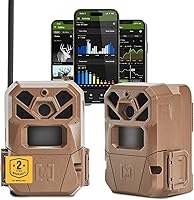
Stealth Cam Fusion Max Cellular Camera Review: Worth It? (October 2026)
The Stealth Cam Fusion Max is a fit for hunters who want cellular scouting with AT&T and Verizon SIM cards in one camera. Its adjustable photo resolution and 1080p video offer options, while the 16 AAA battery requirement calls for a power plan.
On this page (8 sections)
- What does the Stealth Cam Fusion Max offer?
- How should you choose a Stealth Cam Fusion Max setup?
- What do the Fusion Max photo and video settings mean?
- How do you set up the Stealth Cam Fusion Max?
- How should you care for and maintain the Fusion Max?
- What common Fusion Max setup mistakes should you avoid?
- How does the Fusion Max compare with other cellular cameras?
- Is the Stealth Cam Fusion Max worth buying?
The Stealth Cam Fusion Max is a cellular trail camera for remote scouting with AT&T and Verizon SIM cards. It offers adjustable photo resolution, 1080p video and burst captures, while its 16 AAA battery requirement deserves attention before you mount it.
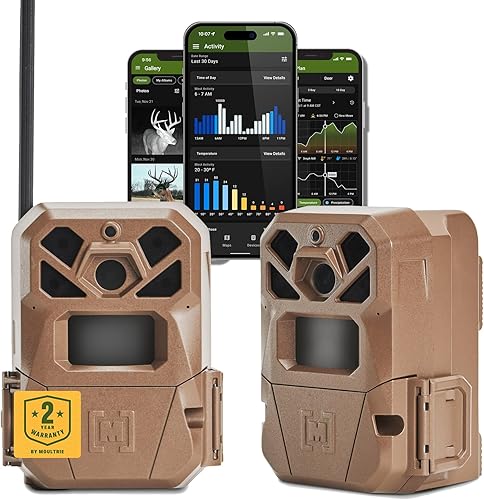
This two-camera pack makes sense if you want to check activity remotely and have two potential carrier networks available. Before choosing it, compare coverage at each location, service plan terms, the Command Pro app and the power source you can maintain.
What does the Stealth Cam Fusion Max offer?
The Stealth Cam Fusion Max combines cellular image delivery, adjustable photo resolution and app control. Its Command Pro app lets you view and share images remotely from an app-enabled mobile device or on the web.
Stealth Cam Fusion Max Cellular Trail Camera: Best for carrier flexibility

- 36MP photo option
- 1080p video
- AT&T and Verizon SIM cards
- 16 AAA batteries
A cellular camera with two pre-installed SIM cards, app control and adjustable photo resolution. It suits remote scouting when you want carrier options and can plan for its battery needs.
Pros
- Pre-installed AT&T and Verizon SIM cards
- Photo resolution options from 36MP to 4MP
- 1080p video
- Burst mode takes 1 to 6 images
Cons
- Requires 16 AAA batteries, not included
- Rechargeable battery cartridge sold separately
Stealth Cam describes an 80-foot detection and infrared flash range, a 0.35-second trigger speed and a burst mode of 1 to 6 images. Those settings suit a trail or opening where animals pass through a defined detection area.
Who should buy the Stealth Cam Fusion Max?
Buy the Fusion Max if you want remote scouting, two carrier SIM cards and the option to change photo resolution. It suits a property where a cellular connection can save repeated trips to check a camera.
Skip it if you cannot confirm service at the camera location, don't want to manage a cellular plan, or find 16 AAA batteries impractical. Its rechargeable battery cartridge and solar panels are separate accessories, so include those in your power plan if standard batteries don't suit your schedule.
How should you choose a Stealth Cam Fusion Max setup?
Choose the Fusion Max when the combination of remote access, carrier flexibility and image options solves a real scouting need. Start by checking signal and service terms, then decide how often you can visit and what images you need.
Cellular coverage can vary across a property, even when a carrier works well elsewhere nearby. The camera's Automatic Network Coverage feature monitors AT&T and Verizon signal strength and connects to the stronger network, according to Stealth Cam, but that does not guarantee a usable connection at every tree.
Read our guide to cellular trail camera plans and carriers before activating a camera. For a broad overview of the category, see our cellular camera guide.
Next, match capture settings to the job. Lower photo resolutions can reduce file size when you need frequent activity checks, while the 36MP setting gives you the camera's highest photo option; use video when seeing movement matters more than reviewing a still image.
The pack includes two cameras, so consider whether you have two useful locations and can support both with power and service. If you need only one camera, compare the total setup needs of other models before choosing a two-pack.
What do the Fusion Max photo and video settings mean?
The Fusion Max offers photo resolutions from 36MP to 4MP and 1080p video. Select a resolution based on how much detail you need and how many files you want to receive and review.
Its burst mode takes 1 to 6 images per trigger. More frames may help you follow an animal moving through the detection zone, but they also create more files to sort through and send.
Stealth Cam describes On Demand photo and video capture through the Command Pro app. Check current plan rules for how on-demand requests affect data use and whether video transfer has separate limits.
Use still photos for routine activity checks when a quick view is enough. Choose video when you need to see movement or behavior, and reserve higher-resolution settings for occasions when additional detail is worth the extra files.
How do you set up the Stealth Cam Fusion Max?
Set up the Fusion Max by confirming service and power first, choosing a clear view, then testing the framing before leaving it in place. Quick Scan QR code setup is designed to simplify getting the cameras running.
- Choose the site. Pick a trail, crossing or opening with a clear view of the area you want to monitor. Avoid aiming through branches that can move into the frame.
- Check coverage. Confirm that the planned location can connect through the available AT&T or Verizon network and review plan terms before activation.
- Prepare power. Install the required AAA batteries or arrange a compatible rechargeable battery cartridge or solar panel. The batteries are not included.
- Mount and aim. Use the multi-position mount or the 1/4-inch threaded insert with compatible hardware. Secure the camera so it faces the travel route rather than an unnecessarily wide area.
- Choose capture settings. Set photo resolution and burst behavior to match your need for detail and the number of files you can review.
- Check the image. Walk through the intended detection area and confirm the framing and app connection before leaving the camera unattended.
The camera has a 12V DC auxiliary jack for compatible external power. If you plan to use an accessory, confirm that it fits your location and mounting arrangement before installation.
How should you care for and maintain the Fusion Max?
Keep the Fusion Max aimed at a clear, stable view and check power, connection and capture settings during visits. A camera that shifts or loses power can miss the area you meant to monitor.
Clear leaves and small branches from the field of view, then check that the mount stays secure. Weatherproof housing helps protect the camera outdoors, but it does not remove the need to inspect the camera and its power setup after severe weather or long periods away.
Choose batteries or an optional power source based on how often you can visit. Our guide to trail camera batteries covers common power choices, and our advice on securing a trail camera from theft can help you plan where and how to mount it.
What common Fusion Max setup mistakes should you avoid?
The most common mistakes are assuming a nearby carrier signal will work at the exact tree, leaving power planning until after mounting, and choosing capture settings without considering the files they create. Each can make a remote camera less useful.
- Don't assume dual SIM means universal coverage. Check the camera's connection at the actual location before relying on remote delivery.
- Don't forget service costs and terms. Cellular access depends on activation and a plan, so compare current terms and any limits on images or video.
- Don't underestimate battery visits. The camera takes 16 AAA batteries; consider how often you'll be able to replace them or whether a compatible accessory power source fits.
- Don't aim too broadly. Place it toward a defined trail or opening and check the frame. A wide, cluttered view can make captures harder to review.
- Don't use the largest settings by default. Higher photo resolution and bursts can create more files. Choose them when the added detail or sequence helps your scouting goal.
How does the Fusion Max compare with other cellular cameras?
The Fusion Max stands out for two pre-installed carrier SIM cards and Command Pro app control. Other cameras fit different priorities, such as internal memory, a 360-degree field of view or GPS-tagged images.
| Camera | Notable details | Consider it if |
|---|---|---|
| Moultrie Edge 2 | 36MP photos, 1080p video with audio, 8GB internal memory | Built-in memory and Moultrie app tools appeal to you |
| Stealth Cam Fusion Max | 36MP-to-4MP photos, 1080p video, 16 AAA batteries | You want two carrier options and Command Pro |
| Stealth Cam Revolver Pro 2.0 | 360-degree field of view, 40MP photos, 32GB internal memory | You want a wider viewing design and internal storage |
| Browning Defender Pro Scout Max | 22MP image capability, 1080p video with sound, GPS-tagged images | GPS tagging and adjustable infrared flash matter |
The Moultrie Edge 2 review covers a camera with internal memory and Moultrie's app features. If brand choice is still open, our Stealth Cam vs Moultrie guide compares the broader decision.
Choose the Moultrie Edge 2 if you value 8GB internal memory and its app tools. Consider the Revolver Pro 2.0 if a 360-degree field of view and internal storage fit your location better, or the Browning if GPS-tagged images and adjustable infrared flash are priorities.
Is the Stealth Cam Fusion Max worth buying?
The Fusion Max is a strong fit when remote access, carrier options and flexible photo settings matter more than a simple battery setup. Its value depends on a usable connection at your site and your willingness to plan for power and cellular service.
Choose it if you can confirm coverage, want to use Command Pro and have a reason to place both cameras in the two-pack. Choose a different model if internal memory is a higher priority, a 360-degree view suits your site, or you need GPS-tagged images.
Before buying, compare the plan terms, power accessories and mounting location against how often you can check the cameras. Our cellular trail camera guide can help you make the final carrier and service decision.
Frequently asked questions
Does the Stealth Cam Fusion Max use AT&T or Verizon?
The Fusion Max has pre-installed SIM cards for AT&T and Verizon. Stealth Cam says its Automatic Network Coverage feature monitors both signal strengths and connects to the stronger network.
Confirm current service availability and plan terms for the camera's location before setting it up.
What batteries does the Fusion Max need?
The Fusion Max uses 16 AAA batteries, which are not included. Stealth Cam says it is compatible with rechargeable FieldMAX battery cartridges, sold separately, and solar panels.
Choose a power source based on how often you can visit the camera and which accessories fit your setup.
Can the Stealth Cam Fusion Max send video to your phone?
The Fusion Max supports 1080p video and remote viewing through the Command Pro app. Stealth Cam describes On Demand photo and video capture that can send captures in real time.
Check plan terms and app settings to understand how video requests and transfers work.
How far can the Fusion Max detect movement?
The Fusion Max has an 80-foot detection range and an 80-foot infrared flash range. Actual results can depend on placement, terrain, target movement and conditions, so aim the camera at a clear trail or opening and check the framing after setup.