Stealth Cam vs Moultrie Cellular Cameras: Which Is Better? (October 2026)
For Stealth Cam vs Moultrie, choose the Edge 3 for buck alerts and Live Aim, the Edge 2 for built-in memory, or the Fusion Max for its faster stated trigger. Check the signal and power needs at your camera site before choosing.
On this page (8 sections)
- Stealth Cam vs Moultrie: what sets the cameras apart?
- Who should choose each cellular camera?
- Which camera captures the action you need?
- Which app tools help you scout remotely?
- How should you plan memory and power?
- How do you set up and care for a cellular trail camera?
- Which Stealth Cam vs Moultrie camera should you choose?
- Sources
For Stealth Cam vs Moultrie, choose the Moultrie Edge 3 for buck detection, Live Aim and GPS, the Edge 2 for built-in memory, or the Stealth Cam Fusion Max for its faster stated trigger. The right choice depends on the signal at your property, how often you can visit, and which app features will help you scout.
All 3 cameras send images remotely through their brand’s app. The Edge 2 and Edge 3 use Moultrie Mobile, while the Fusion Max uses Command Pro.

Stealth Cam vs Moultrie: what sets the cameras apart?
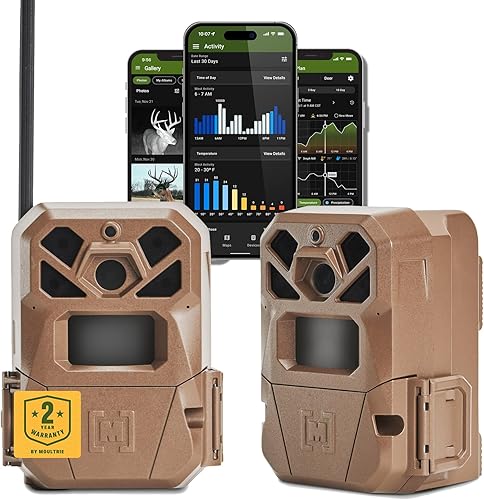
The Edge 3 emphasizes buck alerts and aiming tools, the Edge 2 adds built-in memory, and the Fusion Max pairs dual-carrier monitoring with the fastest stated trigger. Start with the feature that will change how you place or check the camera.
The Fusion Max has a stated 0.35-second trigger, compared with 0.5 seconds for the Edge 3. No trigger-speed figure is specified here for the Edge 2, so compare it by its other features instead of assuming it matches either camera.
Both Moultrie cameras have a stated 100 ft detection range. The Fusion Max has an 80 ft detection and infrared flash range, which is a narrower stated range if you need to cover a broad opening.
The models also differ in how they handle memory and setup. The Edge 2 has 8GB of internal memory, the Edge 3 has Live Aim and built-in GPS, and the Fusion Max uses SD memory and a quick QR code setup.
Which Stealth Cam vs Moultrie connection fits your property?
Choose by the networks each camera can use, then confirm that service reaches your intended mounting point. A multi-network feature can improve your options, but it cannot guarantee a usable signal in every part of a property.
The Fusion Max has 2 pre-installed SIM cards for AT&T or Verizon and monitors their signal strength. The Edge 2 automatically connects across major U.S. networks, while the Edge 3 connects to the strongest of four major U.S. networks.
Check carrier coverage around the property before you buy. At setup, check the signal at the exact camera location and use a site with a clear view of the route you want to monitor.
See our guide to cellular trail cameras, plans and carriers for more on network choice. Our broader cellular camera guide explains the tradeoffs of receiving images remotely instead of retrieving a memory card.
Who should choose each cellular camera?
The Edge 3 is the fit for buck alerts, the Edge 2 for internal memory and app scouting tools, and the Fusion Max for a quick stated trigger with AT&T and Verizon monitoring. Choose the camera whose main feature solves a problem you actually have.
The Edge 3 makes sense when you want to identify buck activity through AI alerts and adjust placement with Live Aim. Its built-in GPS can map camera locations in the Moultrie app, which helps if you manage several cameras or properties.
Skip the Edge 3 if its buck detection and positioning tools are not useful to your routine. Its stated trigger is slower than the Fusion Max’s, and its rechargeable battery packs and solar panels are compatible accessories sold separately.
The Edge 2 suits buyers who want to avoid relying on an SD card for local memory. Its Moultrie Mobile app adds activity charts, maps, pattern analysis and remote settings.
Skip the Edge 2 if removable SD storage is central to your setup or if you need a stated trigger-speed comparison. Its built-in memory is 8GB, and its power accessories are sold separately.
The Fusion Max is a strong match for a trail crossing where quick capture matters and AT&T or Verizon service is available. Its burst mode takes 1 to 6 images per trigger, and Command Pro provides remote image access and camera settings.
Skip the Fusion Max if you want a 100 ft stated detection range or prefer a setup that does not use 16 AAA batteries. Its stated range is 80 ft, and the batteries are not included.
Which camera captures the action you need?
Choose the Fusion Max for the quickest stated trigger, or a Moultrie model for a 100 ft stated detection range. A high photo resolution does not replace careful placement, trigger timing or a useful view of the route.
The Fusion Max captures 36MP photos and 1080p video. Its burst mode gives you up to 6 images per trigger, which can help record a sequence as an animal crosses the detection area.
The Edge 2 captures 36MP photos and 1080p video with audio. The Edge 3 captures 40MP photos and 1080p video, with low-glow infrared flash.
For a trail, aim the camera across the route where possible, rather than straight down it. That gives a moving animal more time in the detection area and can help the camera capture more than a single fleeting moment.
What does detection range mean for placement?
The Moultrie models have a longer stated detection range than the Fusion Max. Use that figure as a comparison point, then choose the camera angle and distance based on the actual trail, opening or feeder you want to monitor.
The Edge 2 and Edge 3 each have a 100 ft detection range. The Fusion Max has an 80 ft detection and infrared flash range, so it may suit a smaller zone where its trigger speed is the priority.
Avoid pointing a camera toward strong background movement, such as swaying branches, if you can choose a cleaner angle. A cluttered view can produce more unwanted captures and make useful activity harder to find.
Our guide on where to place trail cameras explains how to choose an angle and height. For more context on camera features, see our plain game camera buying guide.
Which app tools help you scout remotely?
Choose the Edge 3 for buck alerts and Live Aim, the Edge 2 for scouting charts and maps, or the Fusion Max for remote images and camera control. The most useful app is the one that gives you information you will act on.
The Edge 3’s AI identifies bucks and sends alerts through the Moultrie app. Live Aim previews the camera view in real time, and built-in GPS maps camera locations.
The Edge 2 app includes Game Plan for pattern analysis, activity charting, interactive maps and remote camera settings. It also supports alerts and subscription management.
The Fusion Max uses Command Pro to view and share images remotely and adjust settings. It also supports on-demand photo and video capture.
These features depend on cellular service and app access. If remote images would save you long trips to a camera, read whether cellular trail cameras are worth the cost.
How should you plan memory and power?
Choose the Edge 2 for built-in memory, and plan battery access before mounting any of the 3 cameras. A setup that is easy to maintain matters when a camera is placed far from a road or property entrance.
The Edge 2 has 8GB of built-in memory and cloud storage through the Moultrie Mobile app. The Fusion Max uses an SD card, but a card capacity is not specified here.
The Fusion Max runs on 16 AAA batteries, which are not included. It is compatible with a rechargeable battery cartridge sold separately, as well as Stealth Cam battery cartridges and solar panels.
The Edge 2 supports Moultrie power accessories such as Power Mag, Power Mag+, solar packs and a battery box. The Edge 3 is compatible with EDGE Series lithium battery packs and solar panels.
Estimate how often you can return to each camera before choosing a power option. Our guide to trail camera batteries covers the basics of planning battery changes and power needs.
How do you set up and care for a cellular trail camera?
Set up the app, memory and power plan before fastening the camera in its final position. A short check at ground level can help you avoid returning to fix a missed angle, dead batteries or a camera that cannot connect.
For the Fusion Max, use the QR code setup and activate the camera in Command Pro. Its two pre-installed SIM cards monitor AT&T and Verizon signal strength.
For either Moultrie, activate through Moultrie Mobile and confirm that the app can reach the camera. The Edge 3’s Live Aim can help preview its view while positioning it.
Install the planned power source and memory option before mounting. Then aim at a real route or opening, clear obstructing branches from the frame, and take time to confirm the camera is stable.
Check the view after mounting and again after the first useful image arrives. Keep the lens and infrared area clear of leaves, dirt and spider webs, and close the housing fully after each visit to help keep out weather.
A common mistake is mounting too high or pointing directly down a trail, which can leave a narrow view of moving animals. Another is choosing a cellular camera before checking service at the camera site, then expecting remote delivery to work without a reliable connection.
If theft is a concern, use a suitable lock or security box and choose a mounting spot that is not easy to reach from a road. Our guide to securing a trail camera covers practical ways to reduce risk.
Which Stealth Cam vs Moultrie camera should you choose?
Choose the Edge 3 for buck alerts and Live Aim, the Edge 2 for built-in memory and Moultrie scouting tools, or the Fusion Max for a 0.35-second stated trigger and AT&T or Verizon signal monitoring. The Stealth Cam vs Moultrie decision comes down to the feature you will use most, plus signal and power at your camera site.
If you want a closer look at Moultrie’s earlier model, read our Moultrie Edge 2 camera review. For a broader comparison of camera types, see WiFi vs cellular trail cameras.
Sources
Frequently asked questions
Is Stealth Cam or Moultrie better for cellular trail cameras?
Moultrie fits buyers who want built-in memory on the Edge 2 or buck alerts, Live Aim and GPS on the Edge 3. The Stealth Cam Fusion Max has a 0.35-second stated trigger and monitors AT&T and Verizon signal strength.
Choose according to the feature you will use most at your camera site.
Do the Stealth Cam Fusion Max and Moultrie cameras use the same cellular networks?
No. The Fusion Max has pre-installed SIM cards for AT&T and Verizon and monitors their signal strength.
The Edge 2 uses Auto Connect across major U.S. networks, while the Edge 3 automatically connects to the strongest of four major U.S. networks.
Coverage still depends on the camera’s location, so check service at the mounting point.
Which camera has the fastest trigger?
The Stealth Cam Fusion Max has the fastest stated trigger speed at 0.35 seconds. The Moultrie Edge 3 has a 0.5-second trigger, and no trigger-speed figure is specified here for the Edge 2.
Placement and the direction of animal movement also affect what a camera captures.
Does the Moultrie Edge 2 need an SD card?
No. The Edge 2 has 8GB of built-in memory, so it does not require an SD card.
It also offers cloud storage through the Moultrie Mobile app.
If removable memory matters to you, confirm that the camera you choose supports the card type and capacity you need.
Which camera should I choose for buck alerts?
Choose the Moultrie Edge 3 if you want AI buck detection and instant alerts through the Moultrie app. The Edge 2 offers activity charts and other scouting tools, while the Fusion Max provides remote images and settings through Command Pro.
Match the app features to how you plan to check wildlife activity.